Feature Requests
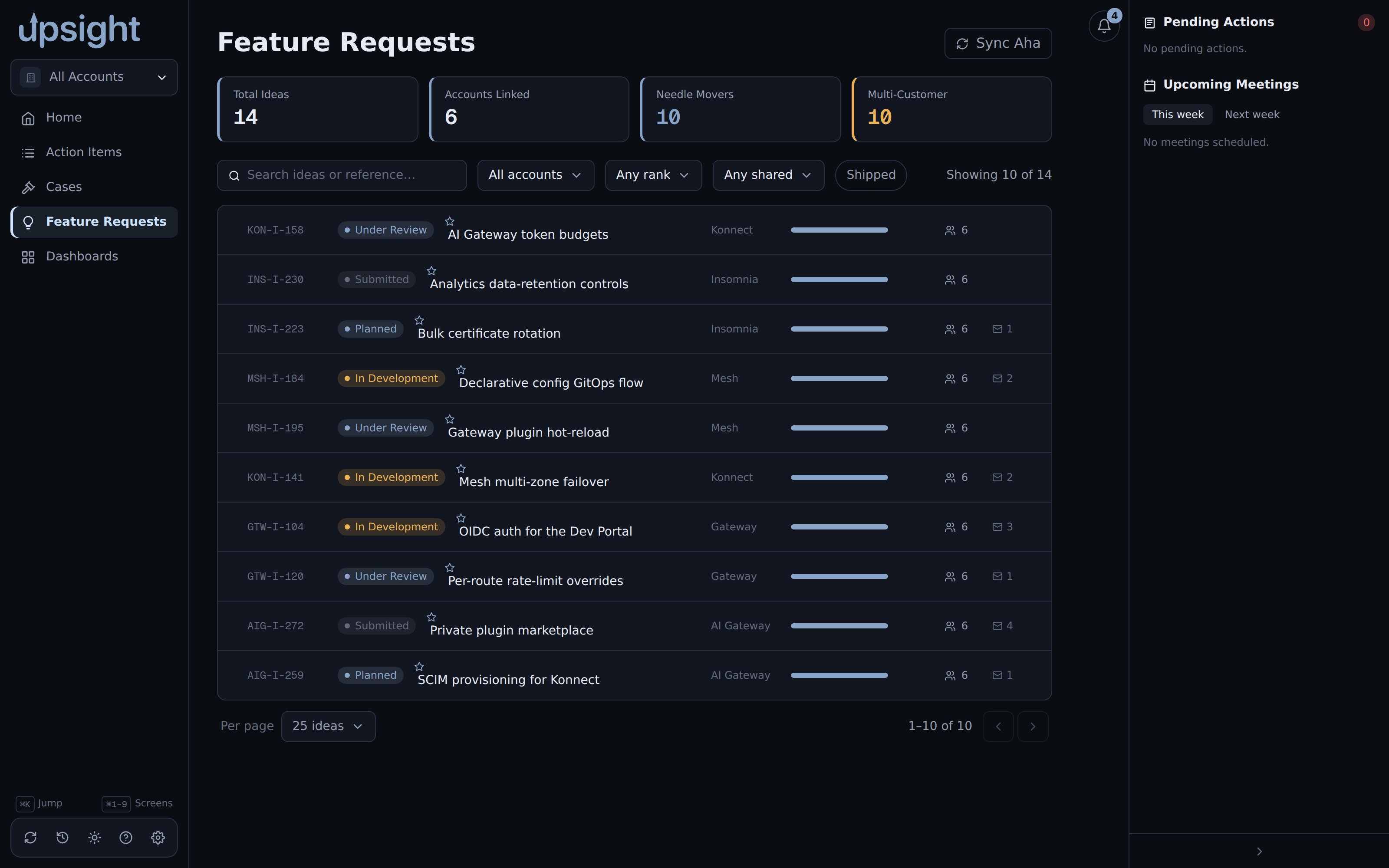
The Feature Requests screen aggregates Aha! ideas across every account you have
synced. It is a global screen, not scoped to one account, reachable from the
sidebar or Ctrl+4.
Syncing from Aha!
Click Sync Aha in the top right to pull the latest ideas for every account. Each idea in Aha! is matched to the accounts that endorse it, and one row is shown per idea with a vote from each endorsing account. A sync that returns no ideas leaves the list unchanged rather than clearing it, so a temporary Aha! outage or a missing token does not blank the screen.
Aha! must be configured under Settings, Integrations, before a sync can pull real data. See Settings.
Metrics and filters
The four cards at the top summarize the current account scope:
- Total Ideas, everything in scope.
- Accounts Linked, how many accounts endorse at least one idea (always counts across all accounts, not just the current scope).
- Needle Movers, live ideas ranked in the top 3 by at least one account.
- Multi-Customer, live ideas endorsed by 2 or more accounts.
Filter the list with the search box, the account dropdown (scope to one account or "All accounts"), the rank filter (Needle Movers or Top 10), the minimum shared-customer count, and the product chips (click a product label on a row to add it as a filter). Toggle Shipped to switch between live ideas and ideas Aha! marks shipped.
The idea detail panel
Click a row to open its detail panel.
Rank. Each endorsing account gets its own rank on the idea, 1 through 10, or Unranked. Change it from the dropdown next to that account, this writes back to Aha! immediately.
Tracking details. Below the rank, each account has its own tracking fields: Requester (a contact from that account), a production-blocker flag, target release, use case, a source link, an internal discussion link, and notes. These save locally per account and idea, independent of rank.
AI-suggested use case. The "Suggest" button next to the use case field generates a draft from context Upsight already has cached for the idea. If the source link is a Slack URL, it instead reads that Slack thread, which needs Slack configured under Settings first. This can take a while, only one suggestion runs per idea at a time.
Comments. The comment thread is real, two-way Aha! commenting: posting a comment here writes it to Aha!, and it becomes visible to anyone with access to the idea there. Posting requires Aha! write-back to be enabled in Settings, Integrations. With it off, posting fails with a message telling you where to turn it on.